Access Your W-2
The State of Kansas issues W-2s by mail or electronically through the Employee Self-Service portal.
- The quickest way to get your W-2 is by accessing it online through the State of Kansas Employee Self-Service portal.
- W-2s are not loaded to HR/Pay or Enroll & Pay.
- KU staff cannot email W-2 forms.
Please note: this information is for the State of Kansas/University of Kansas employees only. If you work for KU Athletics, KU Memorial Unions, KU Med Center, or other organizations, please contact them.
Access Your W-2
Online W-2 Instructions:
Go to the State of Kansas Employee Self-Service website.
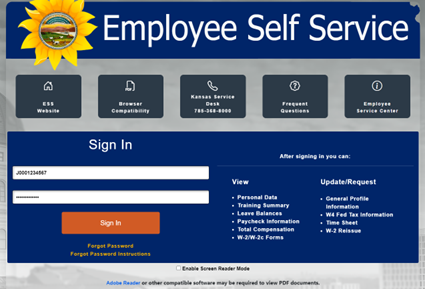
Log in:
- Employee ID - Your State of Kansas Employee ID begins with a capital letter, followed by 10 digits. It can be found on the top of your paystub as SOKS ID. The beginning letter must be capitalized when entered. [Example: J0001234567]
- Access Your Paystub
- Due to a system glitch, SOKS IDs are missing from paystubs with check dates between 5/9/25 - 8/1/25.
- Password:
- If you are a first-time user, you can access a temporary password by signing in with your single sign-on on the Payroll SharePoint site and viewing Step 2b.
- If you are a returning user and do not remember your password, use the Forgot Your Password link under the sign-in button.
- This will ask a security question and give you a temporary password.
- It will then say your password is expired and prompt you to change it.
- Note: If you have not set up security questions in your profile, this option will not work.
- Reset Password: If the above options do not allow access, you will need to have your password reset. KU cannot reset your password since it is a State of Kansas system. You must call the State of Kansas Help Desk. You will need your SOKS ID for the call. This is a quick and common call.
State of Kansas Help Desk
(785) 296-1900 Topeka
1-866-999-3001 Toll-Free
Hours: 8:00 am - 4:30 pm, Mon - Fri
- Employee ID - Your State of Kansas Employee ID begins with a capital letter, followed by 10 digits. It can be found on the top of your paystub as SOKS ID. The beginning letter must be capitalized when entered. [Example: J0001234567]
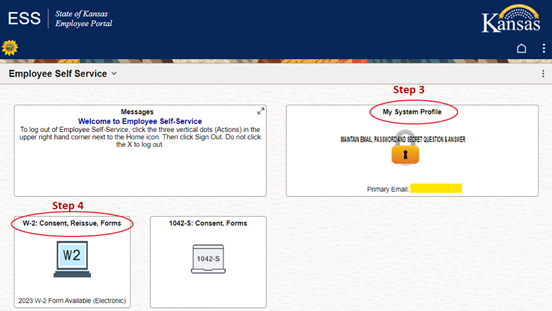
- My System Profile - Maintain Email, Password, and Secret Question & Answer
- Click on the My System Profile Box.
- Add a primary email account, email type, and email address.
- The email should be your own (not a Human Resources email).
- The email does not have to be your KU email.
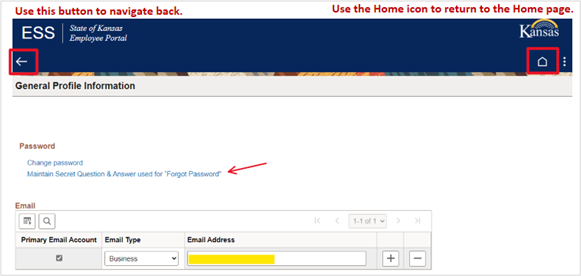
- Click on Maintain Secret Question & Answer used for "Forgot Password" to set up a security question.
- Passwords expire every 30 days so setting up your profile is important.
- If this is already complete, you may skip to step 4.
- Enter a response and click OK.
- It will take you back to the General Profile Information page - click Save.
- Navigate back to the home page.
- Click on the W-2 Consent, Reissue, Forms box.
- The W-2/W-2c Consent is the default page.
- Your consent status will show at the top of the page.
- If it shows you have consented to receive electronic forms, you may skip to step 5.
- This is also where you can withdraw your electronic consent.
- Read the consent.
Click the checkbox to grant consent.
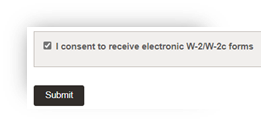
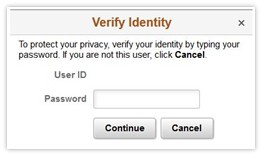
Enter your password to verify your identity and click continue.
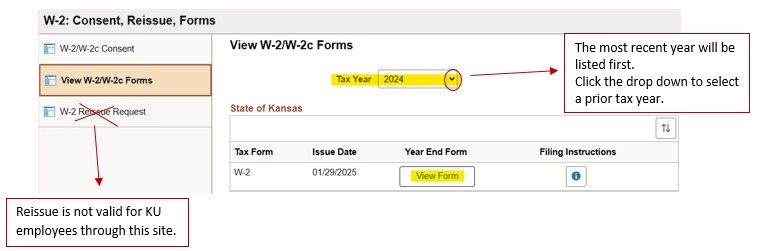
- Click on View W-2/W-2c Forms on the menu on the left side.
- The current W-2 year will show, or you can select the year you wish to view from the drop-down menu at the top of the page.
- Click on the View Form box in the Year End Form column to view your W-2.
- W-2s open as a pdf file in a pop-up window. If you have a pop-up blocker turned on, your browser should have an alert at the top to ask if you wish to allow the pop-up or you can turn off the pop-up blocker.
Helpful Hints:
- If you had to update your profile, log off, close the browser, then start again.
- Try using a different browser. Safari has compatibility issues at times.
- Use a laptop/desktop rather than a mobile device.
Current year W-2s will be mailed from The State of Kansas and must be postmarked by January 31st, per IRS regulation.
Your W-2 will be mailed to the most recent mailing address on file with Human Resources at the time the State of Kansas pulls address information (typically the first of Dec).
- If a mailing address is not available, the home address will be used.
- Update your address online through your HR Pay account.
NOTE: If you had previously given consent to receive your W-2 online, it will not be mailed to you unless you withdraw consent.
Employees who have retired or separated from state service continue to have access to receive their W-2 forms online for 18 months following separation, via the State of Kansas Employee Self-Service portal. See the online W-2 instructions above.
Otherwise, your W-2 will be mailed by January 31st to the address on file with Human Resources.
- If you have been separated from KU for longer than 18 months you will need to submit a request for a duplicate copy by mail for prior years.
If you did not receive your W-2 and prefer not to access it online, you can submit a request via email to the Payroll Office at payroll@ku.edu.
The following information is required in your email request:
- Full Legal Name
- Address (your W-2 will be mailed here)
- Last 4 digits of your social security number
- Year(s) of W-2 you are requesting
Your duplicate W-2 request will be processed within 2 weeks and sent through the regular postal mail. If you need your W-2 quicker, please access it online.